


Investing in an Optical Time Domain Reflectometer (OTDR) is one of the most critical equipment decisions for any fiber contractor, network operator, or utility engineering team. The right instrument pinpoints faults in seconds and passes client acceptance audits on the first run; the wrong one leaves technicians struggling with noisy traces, hidden micro-bends, and unresolvable events.
This guide skips the marketing jargon and focuses on what actually matters when evaluating and buying an OTDR.
4 Core Specifications to Check Before Buying
Spec sheets can be misleading. Here is how the key parameters translate to real-world performance.
1. Dynamic Range: Calculate Real Usable Distance
Dynamic range (in dB) defines the maximum optical loss an OTDR can analyze before the signal gets buried in noise. Never buy purely based on the headline dB number, because that figure is measured at the widest pulse width (20 µs) with minutes of averaging. In the field, testing with narrow pulses significantly reduces effective dynamic range.
Use this rule of thumb to determine the dynamic range you need:
Required Dynamic Range = (Fiber Length in km × Loss Rate in dB/km) + Event Losses + 6 to 8 dB Safety Margin
- LAN, Campus & Data Centers (<10 km): 28 to 32 dB is plenty.
- FTTH / Access Networks (with 1×32 Splitters): A 1×32 splitter introduces ~15–17 dB of insertion loss. You need at least 35 to 38 dB to test past the splitter.
- Metro & Regional Networks (40–80 km): 35 to 42 dB.
- Long-Haul Trunk & Critical Infrastructure (100–200+ km): 45 to 50 dB is required to maintain a clean trace past 150 km.
2. Dead Zones: Event vs. Attenuation
A reflective event (like a connector) temporarily blinds the OTDR receiver.
- Event Dead Zone (EDZ): The minimum distance between two reflective connectors for the OTDR to show them separately. Look for ≤ 1 meter if testing dense patch panels or short drop cables.
- Attenuation Dead Zone (ADZ): The distance needed after a reflection to measure the loss of the next event accurately. Aim for 3 to 5 meters.
3. Wavelengths & Live Fiber Testing
Match the optical module to your cable plant:
- Multimode (LAN/Enterprise): 850 nm / 1300 nm.
- Single-mode (Outside Plant/Metro/Long-Haul): 1310 nm / 1550 nm. Testing both wavelengths is essential because 1550 nm reveals macro-bends and fiber pinching that 1310 nm misses.
- Active FTTH / PON Networks: Requires a dedicated out-of-band 1625 nm or 1650 nm filtered port to test live fibers without disrupting active subscriber traffic or damaging the tester.
4. Hardware Ergonomics: Display & Controls
Field work happens in trenches, bucket trucks, rain, and bright sunlight.
- Screen Size: 8-inch to 10-inch HD screens allow technicians to view the trace, the visual link event map, and the numerical event table simultaneously without constant menu switching.
- Dual Touch & Keypad Operation: Capacitive touchscreens often fail when wet or used with heavy work gloves. Full physical keypad controls ensure uninterrupted work in any weather.
Quick Selection Matrix by Network Type
| Network Type | Typical Distance | Recommended Dynamic Range | Essential Wavelengths | Key Feature to Prioritize |
|---|---|---|---|---|
| Enterprise / Data Center | < 10 km | 28–32 dB | 850 / 1300 nm (MM) or 1310 / 1550 nm (SM) | Short dead zones (<1 m EDZ) |
| FTTH / PON Access | 10–30 km | 35–38 dB | 1310 / 1550 nm + 1625/1650 nm (Filtered) | PON mode, high penetration through splitters |
| Metro & Utilities (Power/Rail) | 40–100 km | 38–43 dB | 1310 / 1550 nm | Dual touch/keypad, high APD precision |
| Long-Haul & Defense Backbone | 100–200+ km | 45–50 dB | 1310 / 1550 nm | 50 dB dynamic range, micro-loss sensitivity |
OTDR Brand Landscape & Recommended Models
The global market features established legacy brands like EXFO, Viavi, and Yokogawa, known for extensive software ecosystems and premium pricing (6,000–15,000+). For engineering teams, utilities, and contractors seeking top-tier optical precision, rugged reliability, and large displays without high brand markups, professional industrial platforms from TFN offer exceptional field value:
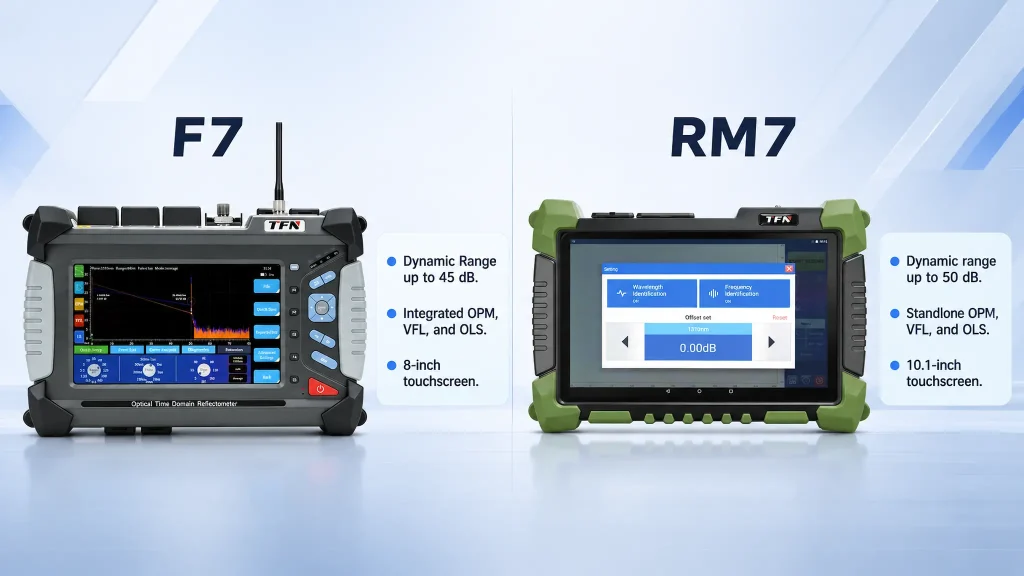
- TFN F7 OTDR(All-Around Field & Utility Workhorse): Equipped with an 8-inch HD display and full dual touch/keypad controls, the F7 provides 35 dB to 45 dB dynamic range with options for single-mode, multimode, and 1625/1650 nm live PON testing. Its high-performance processing enables simultaneous multi-module testing (OTDR, power meter, light source, and VFL) and synchronous display of traces, optical eye diagrams, and event tables on a single screen—making it a preferred choice for power grid, defense, telecom core rooms, and metro contractors.
- TFN RM7 OTDR(50 dB Ultra-Long-Haul Flagship): Built for national backbones, defense private networks, high-speed rail, and trans-regional power utilities, the RM7 features a 10-inch HD touchscreen and an industry-leading 50/50 dB dynamic range capable of analyzing spans exceeding 200 km. It excels at detecting subtle micro-loss events (isolating dozens of low-loss splices across long links) and features modular, detachable plug-and-play accessories including a laser rangefinder and standalone optical power meter.
3 Common Buying Mistakes to Avoid
- Buying only by headline dynamic range. High dynamic range at wide pulse widths won’t help you if the detector’s optical sensitivity cannot resolve closely spaced 0.1 dB splices on shorter runs.
- Forgetting live fiber port filtering. Testing active customer lines with a standard 1310/1550 nm laser risks taking subscriber traffic down and blinding the detector.
- Skipping launch and tail cables. You cannot measure the loss or reflectance of the first and last connectors in a link without launch fiber spools. Always budget for them alongside the instrument.
Preguntas frecuentes
For short campus networks, 28 to 32 dB is sufficient. For standard telecom and metro lines up to 80 km, choose 35 to 40 dB. For long-haul links exceeding 100 to 200 km or testing through high-ratio FTTH splitters, select 45 to 50 dB.
Yes, but only through a dedicated, filtered out-of-band port (typically 1625 nm or 1650 nm). Standard ports will disrupt live traffic and can damage the receiver.
Field technicians frequently work in rain, extreme temperatures, or with safety gloves. When capacitive touchscreens become unresponsive in wet conditions, physical keypads ensure you can still complete the job.