





If you’ve run an OTDR test without a launch cable, you’ve probably noticed the trace starts with a blind region right where your first connector sits. That’s not a coincidence — it’s physics. The launch cable is the fix, and this article covers exactly how to use it correctly: what length you need for different link types, the connector matching rules that catch most technicians off guard, and whether a $50 cable from Amazon will do the job or cost you a retest.
What a Launch Cable Actually Does
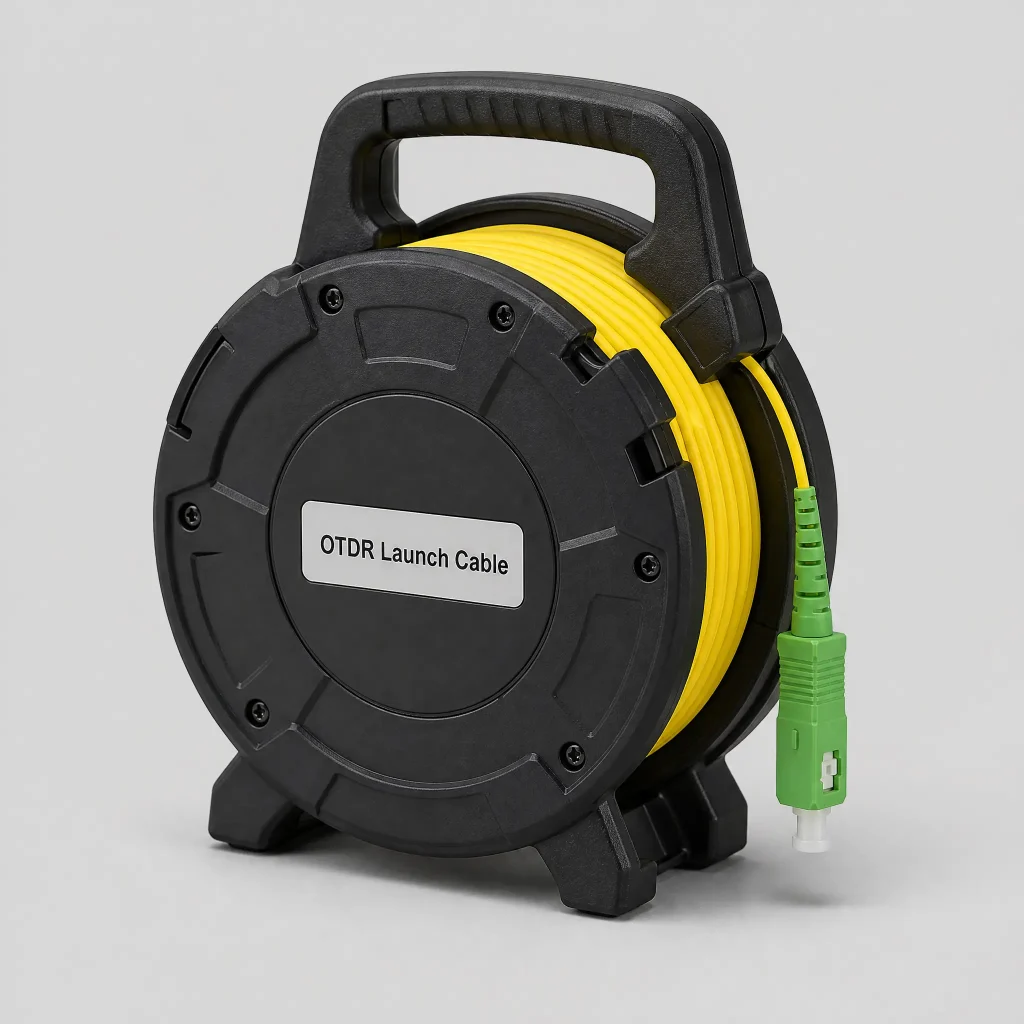
When an OTDR fires a laser pulse, it briefly blinds its own detector — the reflection from the launch port connector saturates the receiver before it can recover and start measuring. This recovery period is the dead zone, and it extends anywhere from a few meters to over 100 meters depending on the pulse width you’re using.
The problem: your first fiber connector falls right inside that dead zone. Without a launch cable, you can’t measure it — the OTDR can see that something is there, but the loss and reflectance values are buried in the saturated noise.
A launch cable solves this by pushing the dead zone back into a cable you already know is good, so your first unknown connector falls in clean, measurable territory.
There’s also a second function that gets less attention: on single-mode fiber, the laser output from an OTDR port isn’t perfectly single-mode right at the launch. It takes a short length of fiber for the light to settle into stable single-mode propagation. A launch cable of 100 m or more gives the signal time to stabilize before it reaches the fiber under test, which is why your loss measurements are more consistent when you use one.
How Long Does Your Launch Cable Need to Be?
The most common question — and the one that gets the most variable answers. Here’s a practical framework:
The rule: your launch cable needs to be long enough that the entire dead zone — event dead zone and attenuation dead zone — fits within the cable, with the first connector on your link falling cleanly outside it.
Since dead zone length increases with pulse width, and pulse width increases with link length, longer links need longer launch cables.
| Comprimento do link | Minimum Launch Cable | Reasoning |
|---|---|---|
| < 500 m (data center, short runs) | 50–100 m | Even short pulse widths produce a dead zone of 10–50 m; 100 m gives margin |
| 500 m – 5 km (campus, FTTH drop) | 100–300 m | Medium pulse widths; 100 m is the practical minimum, 300 m is safer |
| 5 km – 20 km (access network, feeder) | 300–500 m | Longer pulses require more clearance; 500 m is the standard field choice |
| > 20 km (metro, long-haul, OSP) | 500 m – 1 km | 1 µs and longer pulses can produce dead zones exceeding 200 m |
These are practical starting points. If you’re unsure, err toward longer — a launch cable that’s slightly longer than necessary costs nothing in measurement accuracy, while one that’s too short defeats its purpose entirely.
The receive cable: for the same reason, you should add a receive cable at the far end when you have physical access to it. The end-of-fiber reflection causes another dead zone, and without a receive cable, the last connector on your link may fall inside it. The same length guidelines apply.
Connector Type Matching: The Rule That Catches Everyone
Your launch cable must match the fiber type and connector type at the OTDR port e at the fiber under test. Getting either one wrong gives you a measurement that looks valid but isn’t.
Fiber type: single-mode launch cables must be used with single-mode fiber under test, and multimode with multimode. Mixing them is the most common cause of inflated loss readings that can’t be explained any other way — the mode mismatch at the junction scatters light in ways that register as connector loss but are actually a test setup error.
Connector end at the OTDR port: match whatever your OTDR’s port accepts — typically SC/UPC, SC/APC, or LC/UPC for most current instruments. Using the wrong polish type (UPC vs. APC) here causes a large back-reflection spike right at the start of the trace that inflates your launch connector reading.
Connector end at the fiber under test: this is where many technicians get caught. If your link starts with an SC/APC connector but your launch cable has SC/UPC at that end, the mismatch will register as 0.5–1.5 dB of insertion loss at that junction — the kind of number that fails an acceptance test and triggers a pointless re-inspection before someone notices the adapter mismatch.
Standard practice for field technicians who work across multiple connector types: carry launch cables with different connector types on the “link” end, or use a short adapter tail to bridge the mismatch. The OTDR end should match your instrument’s port (fixed), but the far end can be adapted.
DIY vs. Buying: An Honest Comparison
This comes up regularly among field technicians, particularly when they’re looking at $300–600 branded launch cables and wondering whether a spool of SM fiber with two connectors polished in the shop would do the same job.
The short answer: yes, you can build a functional launch cable, and many experienced technicians do. But there are real failure modes to understand.
What makes a good launch cable — bought or built:
- Low insertion loss at both connectors (< 0.3 dB for SC/APC; < 0.5 dB for SC/UPC)
- Low back-reflection, especially at the OTDR port end (< -55 dB for APC connectors)
- No events on the cable itself — a launch cable with internal bending or damage defeats its purpose, because you’re now trying to interpret splice events that are part of your launch, not your link
- Consistent fiber type throughout (no splices, no mode field diameter changes mid-cable)
If you build your own:
Inspect both connectors with a fiber microscope before using it, and run it through your OTDR first to confirm it’s clean and event-free. A cable with a dirty endface or a scratch across the core will add its own loss to every test you run, and you’ll have no way to know whether that 0.2 dB connector loss is the launch or the link.
The main risk with building: if the cable develops an internal fault (from repeated handling, sharp bending, or a bad connector termination), it will start showing phantom events in your trace. Since you’re using it as a reference, those events become invisible noise that skews every test until you identify the cable as the problem — which usually happens only after you’ve already signed off on a job and gotten a callback.
The case for buying:
A professionally manufactured launch cable from a recognized supplier comes tested, with connector loss and back-reflection values on a test certificate. If something goes wrong with it later, the failure mode is obvious (a sudden event at a known distance). The cost premium over a DIY cable is usually recovered in one avoided retest.
Cheap cables from online marketplaces: the Reddit experience is predictable here. A 500 m cable that measures 550+ m on the OTDR and shows six events is a cable where the manufacturer cut corners on the fiber or the connector termination. For non-critical work, it may be functional; for acceptance testing and certification, the risk of using an untested reference cable isn’t worth the saving.
Using the Launch Cable: Mistakes That Invalidate the Test
Not inspecting the connectors before connecting. Contaminated endfaces on the launch cable are a direct path to wrong measurements. Inspect and clean every connection before each test session.
Coiling too tightly. Launch cables are typically wound on a spool, which is fine — but improvised coiling with a diameter under about 30 mm can introduce macro-bending loss in the cable itself. Keep coils at 50 mm diameter or larger, or use the manufacturer’s spool.
Using a multimode launch cable on a single-mode link. It looks like it fits. The adapter accepts the connector. The trace looks almost normal. But the mode mismatch adds 1–3 dB of apparent loss at the junction and makes every connector reading downstream untrustworthy.
Forgetting the receive cable. If you’ve done everything right on the launch end but have no receive cable, your last connector is still in the dead zone. For one-ended testing (common on long links where you can’t access the far end), this is unavoidable — note it in the test report. For acceptance testing where you have both ends, a receive cable isn’t optional.
Quick-Reference: Launch Cable Selection
| Parâmetro | Your Choice |
|---|---|
| Fiber type | Must match fiber under test (SM or MM) |
| OTDR-end connector | Must match your OTDR’s optical port |
| Link-end connector | Must match first connector on fiber under test |
| Minimum length | See table above; when in doubt, go longer |
| Inspect before each use | Yes — both ends, both launch and receive |
| Events on the launch cable itself | Zero acceptable; any event = retire or repair |
Perguntas frequentes
No. Fiber type must match. If your OTDR supports both, you need separate launch cables for each.
Longer than necessary — no effect on accuracy, slight addition to total trace length. Shorter than the dead zone — the first connector falls in the blind region and can’t be accurately measured. Stay within the guidelines above and err longer rather than shorter.
Some OTDRs include a short internal launch fiber (typically 2–5 m) that moves the initial dead zone slightly off the port, but this is not sufficient for most field applications. 2–5 m doesn’t get you out of the dead zone from typical pulse widths. You still need an external launch cable.
Same function, different packaging. A launch cable is a spool of bare fiber with connectors on each end. A launch box puts the same fiber in a housing with a reference connector panel, which makes connector swapping easier and protects the fiber. Launch boxes are typically used on benches and in test labs; launch cables on spools work better in the field.
Related reading:
- What is an OTDR dead zone? → OTDR Dead Zone Explained