





In fiber optic network maintenance, rapidly and accurately pinpointing a fault is crucial for minimizing service outage time and improving operational efficiency. Traditional methods rely on OTDR distance measurement followed by manual inspection, which is time-consuming and labor-intensive. This is especially challenging in complex environments like conduits or manholes, where accurately identifying the faulty fiber among a bundle of cables is a major hurdle. As a field engineer, my essential tool for this task is the Optical Cable Identifier. This article will detail, based on my hands-on experience with the TFN GP200 Enhanced Optical Cable Identifier, a systematic approach to achieving fast, non-destructive cable fault locate.
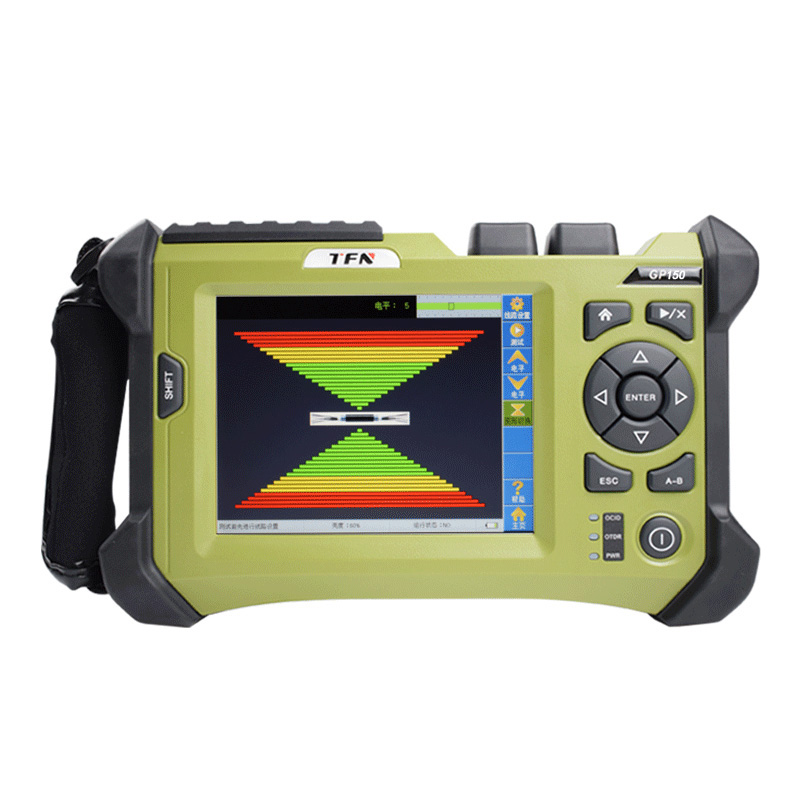
Understanding the Core: How Does an Optical Cable Identifier “Hear” the Cable?
Before using the device, understanding its operating principle is essential. An Enhanced Optical Cable Identifier like the TFN GP200 is not simply a power meter. Its core functionality (OCID mode) is based on the elasto-optic effect and optical interference principles.
The device injects a modulated 1550nm laser signal into the fiber under test. When the fiber is subjected to external mechanical disturbance (like tapping), the stress induces minute changes in the fiber’s refractive index (elasto-optic effect), altering the phase of the light traveling within it. The device’s built-in interferometric detection system is extremely sensitive to these phase changes, converting them into an electrical signal. This is finally displayed on the screen as a real-time “ECG” waveform or bar graph and output as a synchronous audio signal through headphones.
This means the entire length of the tested fiber acts like a giant microphone. When you tap the target cable at a remote location, the device at the near end can clearly “hear” and “see” this distinct vibration signal, allowing it to accurately identify the target cable from among multiple parallel ones. This is the core principle behind how to identify fiber optic cable without damage.
Field Procedure: Rapid Fault Location with the TFN GP200
The following workflow combines standard operating procedures with field-tested techniques for efficient fault location in optical fiber.
Phase 1: Pre-Operation Preparation and Safety Check
Professional operation starts with attention to detail. After unpacking the TFN GP200, I typically perform the following checks:
1. Device Status: Power on by holding the power button, and check battery level. Ensure all accessories are present: FC/APC test patch cord, tapping rod, headphones, and cleaning tools.
2. Safety First: Heed the laser safety warnings in the manual. Never look directly into the device’s optical port or connected fiber end face. Always replace the dust cap after testing.
3. Information Gathering: Coordinate with the network operations center to confirm the faulty cable’s port, fiber core sequence, and the approximate fault distance provided by OTDR. This significantly narrows down the search area.
Phase 2: Device Connection and Initial Setup
This is the foundation for a successful test; any poor connection can lead to weak or failed signal detection.
1. Clean Connections: Meticulously clean the GP200’s OCID optical port (FC/APC), both ends of the test patch cord, and the adapter faceplate on the ODF rack using lint-free swabs and alcohol. This is a critical step emphasized in the manual but often overlooked.
2. Proper Connection: Reliably connect the GP200’s OCID port to the port of the faulty fiber core on the ODF rack using the test patch cord.
3. Enter OCID Mode: Select the “OCID” function module from the main menu. After entering the test interface, I usually first click “Line Settings” to perform an end-length test. While its primary purpose is to set the identification range, the resulting trace provides immediate verification of fiber connectivity. A complete break can often be detected here.
4. Sensitivity Adjustment: Based on the approximate fault distance from the OTDR, set the “Level” value (sensitivity) by referring to the recommendations in the GP200 manual. For example, for faults within 40 km with weak end reflection, sensitivity should be set to level 10 or 11. For closer faults with strong reflection, lower sensitivity (levels 4-1) is needed to prevent signal saturation. This is a practical tip for optimize cable identifier sensitivity.
Phase 3: Remote Tapping and Precise Identification
This phase involves coordination with field personnel at the suspected fault site.
1. Establish Communication: Maintain clear voice communication via mobile phone with personnel at the fault location.
2. Near-End Monitoring & Preparation: On the GP200, click the “Test/Stop” button to begin testing. Have the field personnel gently tap the patch cord connected to your device. A clear waveform jump on the screen confirms good local connection.
3. Field Operation Key Points:
Cable Isolation: Instruct field personnel to physically separate the cables to be tapped from the bundle for at least 1 meter, or use foam padding for isolation. This is the most effective measure to overcome cable crosstalk during identification, preventing vibration from transferring through physical contact to non-target cables and causing misidentification.
Rhythmic Tapping: Use a metal tapping rod (e.g., a wrench) to tap with a regular rhythm of about once per second. Rhythmic signals are easier to distinguish from background noise.
Sequential Testing: Field personnel should tap each suspected cable in sequence, verbally calling out the identifier for each.
4. Near-End Identification:
I closely watch the GP200’s screen waveform while wearing headphones. When a particular cable is tapped, if the “ECG” on the screen shows strong fluctuations synchronized with the tapping rhythm and significantly higher in amplitude than others, accompanied by clear “tap, tap” sounds in the headphones, that cable is the target faulty cable.
Using the “Graph Switch” button, I can toggle between ECG and bar graph modes to confirm the signal in the most intuitive way.
Phase 4: Fault Point Pinpointing and Verification
Once the faulty cable is identified, the fault pinpointing process begins.
1. Precise Localization: Instruct the field personnel to move the tapping point progressively along the identified cable back toward the central office/your location, while you continuously monitor the signal strength on the GP200. The signal strength will gradually decrease as the tapping point moves away. The critical turning point is when the tapping point moves past the actual fault location (e.g., break or severe bend), causing the signal to drop sharply or disappear completely. This point of abrupt signal change marks the precise fault location.
2. OTDR Verification: For complex faults, after the identifier has located the cable, immediately use the GP200’s OTDR function module to perform precise distance-to-fault and event analysis on that specific fiber core. This combination provides a perfect fiber fault finding solution—quickly identifying which cable is faulty and precisely analyzing the fault type and loss.
Key Tips for Success and Important Notes
- Tapping Point Selection: Place the test device at the end closer to the suspected fault. For example, if the fault is 10 km from Site A and 30 km from Site B, testing from Site A will yield a stronger signal.
- Handling Weak Reflection: If the fault point has very weak back reflection (e.g., an irregular break), the identification distance may be reduced. Try temporarily connecting a live connector at the far end to enhance reflection and improve the signal-to-noise ratio.
- Managing Interference: In noisy environments, relying on a combination of audio from headphones and the visual waveform on screen is more reliable than depending on just one.
- Device Maintenance: Regularly clean optical interfaces as per the manual. Charge the battery monthly if the device will be stored long-term, ensuring it is always in optimal condition.
Conclusion
For modern optical network maintenance engineers, an Fiber Cable Identifier like the TFN GP200 is no longer an optional tool but a standard piece of equipment for enabling rapid response and minimize network downtime. It transforms the tedious process of “guessing the cable” into a scientific, intuitive, and collaborative technical procedure. By understanding its principles, strictly following operational protocols, and applying field knowledge, you equip yourself with the “eyes and ears” to quickly navigate the complex maze of cables and pinpoint faults.
If you want to know more about the operation of ocid tester and TFN GP200 optical cable identifier, welcome to contact TFN support team:
Email: info@tfngj.com
WhatsApp: +86-18765219251
Or you can leave messages here