





In the daily work of communication operators—including enterprise line delivery, network acceptance, fault location, and SLA verification—the bit error test is one of the most critical testing items for Ethernet links. It directly reflects the transmission quality of the physical layer, data link layer, and even upper-layer services. For operators, a stable and low bit error rate ensures the reliable transmission of voice, video, cloud services, and industrial data services.
This guide is written from the perspective of telecom operators, combined with the TFN T200K Ethernet tester, to fully explain the principles, application value, operation process, parameter configuration, and result judgment of bit error tests in Ethernet testing scenarios.
1 What Is a Bit Error Test in Ethernet
1.1 Definition of Bit Error Test
A bit error test (BERT) is a measurement method that sends standard test data streams, compares received data with transmitted data, counts error bits, and calculates the bit error rate (BER). It is used to evaluate the transmission stability, anti-interference ability, and link integrity of optical fibers, network cables, switches, routers, and bearer devices.
For operator-level Ethernet networks, the acceptable bit error rate is usually between 10⁻⁹ and 10⁻¹². If the BER exceeds this range, services such as packet loss, lag, disconnection, and abnormal signaling transmission will occur.
1.2 Why Operators Must Perform Bit Error Tests
- Acceptance of dedicated lines and IPRAN/OTN bearer links
- Fault location between physical layer and protocol layer
- Evaluation of network quality before commercial use
- Verification of SLA indicators for enterprise customers
- Routine maintenance and hidden danger elimination
2. Advantages of T200K Ethernet Tester for Bit Error Test
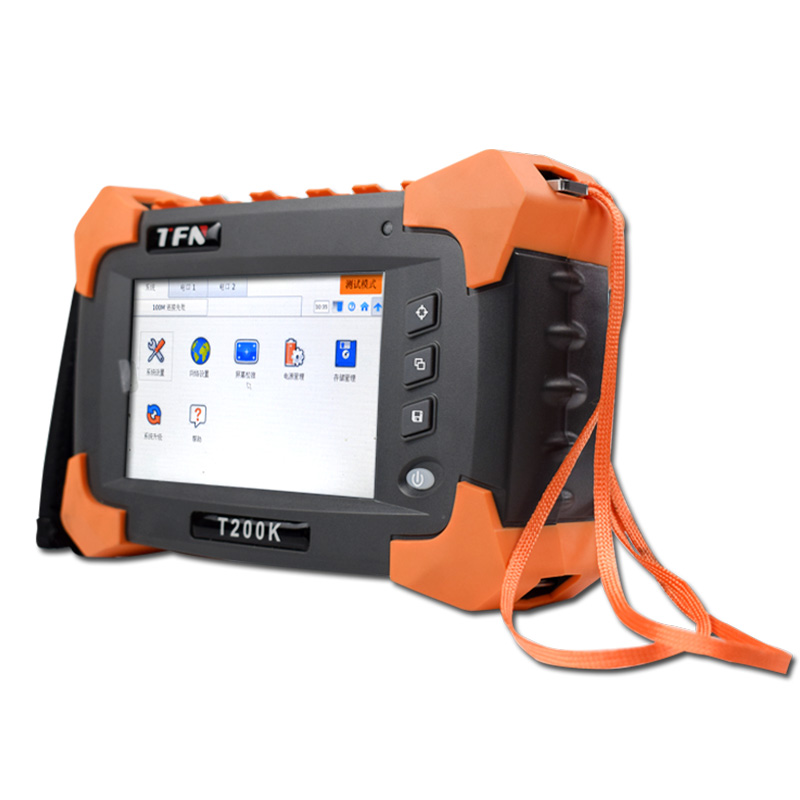
The TFN T200K is a portable 1000M Ethernet tester widely used by operators for on-site testing. It integrates complete bit error test functions and supports end-to-end full-scenario verification.
2.1 Professional Bit Error Test Capabilities
- Supports Layer 1–4 full-rate bit error test
- Provides standard patterns: PRBS31, PRBS23, PRBS15, PRBS11, CRPAT, CJPAT
- Supports user-defined patterns and code inversion
- Frame length adjustable from 64 to 9600 bytes
- Compatible with VLAN, MPLS, and Q-in-Q environments
- Supports error injection: Bit, CRC, IP Checksum, TCP/UDP Checksum
- Real-time display: BER, frame loss, LOS, SDT, and traffic statistics
2.2 Hardware Features Suitable for Operators
- Dual 10/100/1000M electrical ports + dual 100/1000M SFP optical ports
- 5-inch HD touch screen with graphical interface
- Built-in lithium battery supports 4 hours of continuous testing
- Supports remote loopback and Discover search
- One-key report generation and USB export
3. Standard Bit Error Test Procedure (Using TFN T200K)
3.1 Preparation
- Conect the optical or electrical port to the link under test.
- Insert the SFP optical module and turn on the laser.
- Power on the TFN T200K and enter the main interface.
- Select the corresponding port and confirm link status.
3.2 Parameter Configuration
- Enter the BERT function module.
- Set test layer: Ethernet, IP, TCP, or UDP.
- Configure MAC, IP, VLAN, or MPLS labels according to the network environment.
- Select test pattern, frame size, bandwidth percentage, and test duration.
- Enable receiving filter rules if needed.
3.3 Remote Loopback Settings
- Use the Discover function to search remote devices.
- Select the target device and set Loopback mode.
- Ensure local and remote layers are consistent.
3.4 Start Testing and View Results
- Tap Start to run the bit error test.
- View real-time indicators: bit error count, BER, frame loss, link status.
- After testing, save the test report in HTML format via USB.
4. Common Faults and Operator Judgment Standards
4.1 High Bit Error Rate
Possible causes:
- Dirty or damaged fiber connectors
- Transceiver power abnormality
- SFP module incompatibility
- Cable interference or damage
4.2 Frame Loss
Possible causes:
- Duplex mode mismatch
- Flow control configuration error
- Bandwidth congestion
- Device performance bottlenecks
4.3 Intermittent Errors
Possible causes:
- Poor contact
- Device overheating
- Electromagnetic interference
4.4 Operator Acceptance Standard
- Test duration ≥ 15 minutes
- Bit error rate ≤ 1×10⁻⁹
- No frame loss, no LOS, no service interruption
5. Summary
For communication operators, the bit error test is the foundation of Ethernet network quality control. The T200K Ethernet tester provides stable, professional, and easy-to-use bit error test functions, helping operators complete line acceptance, fault location, and maintenance efficiently.
Standardized bit error testing can significantly improve network stability, reduce failure rates, enhance user satisfaction, and provide solid support for full-service bearer networks.
If you are interested in TFN T200K Ethernet testers, welcome to contact us:
Email:info@tfngj.com
WhatsApp:+86-18765219251
O puedes leave messages here